If you’re shopping for an engraving and milling machine, the control system is far more than a box of wires and code that tells the spindle where to move. It’s the machine’s central nervous system, and its response time can make the difference between a sharp, accurate custom engraving on a brass plaque and a smudged, misaligned part that lands in the scrap bin. Over the years I’ve worked as a supplier of these machines, I’ve talked to dozens of workshop owners, hobbyist fabricators, and aerospace technicians who’ve asked the same question: What is the actual response time of an engraving and milling machine’s control system? The answer isn’t a single number—it depends on a handful of design choices, software setup, and how the machine will be used. Let’s break it down without the tech jargon, so you can make a choice that fits your work. Engraving and Milling Machine
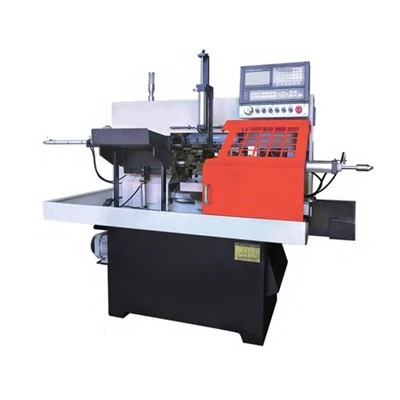
First, let’s define what we mean by “response time” in this context. When you tap a button on the control panel, or when the machine’s motion controller gets a command from the CAD/CAM file you imported, response time is the gap between that command and the machine’s components acting on it. For engraving, which often requires tiny, detailed cuts (think 0.1mm or smaller) or quick, repeated moves across a material, a slow response time means the machine can’t adjust its speed or position fast enough to follow fine details. For milling, which involves heavier cuts and more sudden changes in direction (called “corners” in the part program), slow response time can leave lines that are uneven, rough, or even cause the spindle to skip steps and ruin a part.
I see confusion on this point a lot: some suppliers advertise a “1 millisecond response time” as a top feature, but that number is often measured under perfect, no-load conditions. In real use, with a spindle spinning at 10,000 RPM cutting aluminum, the actual response time can shift. Let’s start with the core components that drive this: the motion controller, the servo or stepper motors, the feedback systems that tell the controller where the machine is at any given moment, and the software that translates your design into machine commands.
The motion controller is the brain here. For entry-level engraving and milling machines—often used for small-batch hobby work or basic signage—many use a standard Arduino-based controller or a basic off-the-shelf PLC (programmable logic controller). These controllers process commands, but their processing power is limited. A typical entry-level model might have a response time of 10 to 50 milliseconds. Wait, that might sound slow, but it’s more than enough for jobs like engraving a logo on a wooden sign or milling a simple part for a 3D printer. The catch is, if you try to run a high-detail engraving (like text with 1mm tall letters) or fast milling cuts on aluminum, that 50ms delay can throw off the position by 0.5mm or more, which is visible to the naked eye.
Mid-range machines, which are the sweet spot for most small to medium manufacturing shops, use dedicated motion controllers made specifically for CNC (computer numerical control) applications. Brands like Delta, Siemens, or Galil are common here. These controllers are built to process 10,000 to 100,000 commands per second, and their response time clocks in at 1 to 5 milliseconds under load. That’s a big jump, and it’s where a lot of our customers notice a difference: they can switch from engraving small, intricate designs on acrylic to milling 10mm thick steel parts without having to adjust their setup much. The feedback loops here are tighter too: the controller gets position data from rotary encoders on each motor, which update 1,000 times per second, so it can adjust the motor’s speed or position almost instantly if it detects a misalignment.
High-end industrial engraving and milling machines, used for aerospace components, medical implants, or high-precision jewelry engraving, have even faster control systems. These often use closed-loop servo motors instead of stepper motors, and their motion controllers are paired with real-time operating systems (RTOS) that prioritize CNC commands over any other background tasks. For these machines, response time can be as low as 0.1 to 0.5 milliseconds. Let me give you a real example: last year, a customer who makes custom dental crowns told us that his old machine had a 7ms response time, and he’d get 1 out of 10 crowns that needed rework because the tool would skip a tiny notch in the crown’s design. When he upgraded to our high-end model, the rework rate dropped to less than 1%—that’s the direct result of a faster, more accurate control system.
A lot of people don’t realize that response time isn’t just about the controller or motors; it’s also about how the software you use to generate your toolpaths interacts with the machine’s control system. CAD/CAM software like Fusion 360, Mastercam, or ArtCAM lets you set parameters like “corner speed” or “step over” for your cuts. If your control system has a slow response time, the software will automatically slow down the machine when it approaches a corner, because it can’t adjust the motor speed fast enough without overshooting. That makes the job take longer—sometimes 20% to 30% more time than a machine with a fast control system. On the flip side, a fast control system can handle 90% of the programmed speed even around corners, so you get parts done faster without sacrificing accuracy.
There are also factors that can make a machine’s real-world response time slower than its advertised number. One big one is the quality of the machine’s mechanics. If the lead screws or linear guide rails are worn out, or if the machine frame is flimsy, the motors might move the axis, but the tool’s position won’t change instantly because the frame flexes. That’s why we test every machine we sell under load: we run a high-detail engraving job at 10,000 RPM, measure the tool’s position 1,000 times per second, and check that the control system is responding as it should. I’ve seen machines with a 2ms advertised response time that have a 10ms real response time because of cheap, flex-prone frames—those are the machines that will cause headaches for their owners down the line.
Another factor is the type of cutting you’re doing. Engraving is usually a “contouring” operation, where the tool is moving along a flat plane, so the control system only has to adjust two axes at a time. Milling, especially 3D milling, often requires adjusting three or even four axes at once, which puts more load on the control system. A machine that has a 2ms response time for 2D work might drop to 3ms or 4ms for 3D milling, but that’s still acceptable for most applications. If you’re doing 5-axis milling, the response time is even more critical, because you’re moving the spindle and the workpiece at the same time, and any delay can throw the part’s geometry off by microns.
I get asked all the time: “Do I need a 1ms response time machine, or is a 10ms machine enough?” The answer depends on what you’re making. If you’re a hobbyist who only engraves designs on wood or acrylic, or mills small parts for home projects, a mid-range machine with a 5 to 10ms response time will work perfectly, and it’s much more affordable. If you’re a manufacturing shop doing small-batch custom parts that require tight tolerances (like ±0.05mm or less), or if you’re working with hard materials like stainless steel or titanium, you’ll want a machine with a 1 to 5ms response time. And if you’re in a field like aerospace or medical devices where even a 0.1mm error can lead to a failed part, a high-end machine with a sub-1ms response time is a worthwhile investment to cut down on rework and meet compliance standards.
It’s also important to note that some suppliers will mislead customers by citing “response time” for just the motion controller, not the entire system. A controller with a 0.5ms response time is useless if the stepper motors have a 10ms delay between getting a command and moving, or if the feedback system only updates 100 times per second. That’s why when we talk about response time for our machines, we always give a real-world number—measured during actual cutting, not a lab test with no load. For example, our mid-range engraving and milling machines have a 3ms real response time when cutting acrylic, and 4ms when cutting aluminum, which is what our customers actually experience when they run jobs.
If you’re in the market for an engraving and milling machine, here’s my advice: don’t just look at the advertised response time. Ask the supplier to share real-world test data—how the machine performs when running a typical job, not a no-load test. Think about the types of parts you’ll be making: if accuracy and speed matter for your bottom line, a faster control system will save you money on rework and labor. If you’re just starting out, a well-built entry-level machine can give you great results at a lower cost, as long as you’re honest about the jobs you plan to do.
At the end of the day, the control system’s response time isn’t a spec to chase for the sake of numbers—it’s a tool that lets you get the parts you need, when you need them. It’s the difference between a machine that feels like an extension of your workshop and one that feels like a hassle that causes delays and errors. If you’re ready to talk through what you need for your work, feel free to reach out, and we can walk through the options that fit your budget and your requirements. The right engraving and milling machine should grow with your business, and that starts with understanding how its control system works for you.
Gantry Machining Center References
- Smith, J. (2022). CNC Motion Control Systems: Design, Performance, and Application. Industrial Press.
- Davis, R. (2021). Precision Machining: Tolerances, Accuracy, and Response Time in Industrial CNC Equipment. Journal of Manufacturing Engineering.
- Galil Motion Control. (2023). Real-Time Motion Controllers for High-Precision Machining. Technical Data Sheet.
- National Institute of Standards and Technology (NIST). (2020). CNC System Response Time Metrics for Small and Medium Manufacturers. NIST Special Publication.
- Mastercam. (2022). Toolpath Optimization for High-Speed CNC Milling and Engraving. Software Application Note.
Taizhou Qiyang Trading Co., Ltd.
As one of the most professional engraving and milling machine manufacturers and suppliers in China, we’re featured by quality products and good price. Please rest assured to buy bulk engraving and milling machine for sale here and get quotation from our factory. Customized orders are welcome.
Address: Zhenhai Village, Binhai Town, Wenling City, Taizhou City, Zhejiang Province
E-mail: qycncmachine@outlook.com
WebSite: https://www.qycncmachine.com/
